
Infinite Campus Logins for Students
Posted Date: 07/14/26 (03:40 PM)
Greetings, Eagles!
We hope you have had an amazing summer so far! Believe it or not, Open House is just around the corner (Monday, July 27th). First-semester schedules will be available for students in Infinite Campus just prior to Open House, and we want all students to make sure they can log in to their Infinite Campus accounts.
PLEASE NOTE: Schedules are not yet available. We will send a follow-up ParentSquare message with directions for viewing schedules closer to Open House.
STUDENTS: Please make sure to do the following before Open House:
- Visit your JCSS Student Login page via this INFINITE CAMPUS LINK.
- Try your login information.
- Your username is your Student ID Number (this is the same as your lunch number).
- Your password is whatever you last set it to.
- If you forgot your username or password, please complete the following steps:
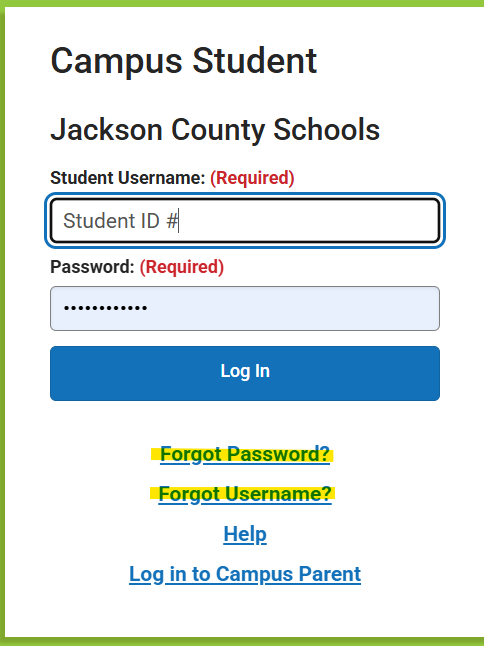
- Click "FORGOT USERNAME" OR "FORGOT PASSWORD" on the Infinite Campus login screen (as shown below) and complete the information to reset your password. Information will be sent to the email address you have listed in your Infinite Campus profile. Check your email for the password reset link.
- If you do not receive a password reset email or still need assistance logging into your account, please complete this INFINITE CAMPUS SUPPORT FORM so that we can provide assistance.
- Click "FORGOT USERNAME" OR "FORGOT PASSWORD" on the Infinite Campus login screen (as shown below) and complete the information to reset your password. Information will be sent to the email address you have listed in your Infinite Campus profile. Check your email for the password reset link.